
RECOGNITION DIRECT · EMPLOYEE BADGE GUIDE
How to order employee name badges and photo IDs
Choose a badge, prepare your team’s details, and approve the artwork before production. Family-run since 1984, with U.S. shipping and Spring Valley pickup.
Download a name badge list template
Prepare your team’s names, job titles, and copy quantities in one list. Use this CSV template for engravable or full-color name badges.
Download name badge CSV templateThe file contains three fictional examples. Replace or delete every sample row before importing your own list.
| Name | Title | Copies |
|---|---|---|
| Jamie Rivera | Office Manager | 1 |
| Alex Taylor | Team Leader | 1 |
| Morgan Lee | Leave blank | 2 |
- Keep the first row as Name, Title, Copies. Use one person per row. Titles are optional; Copies should be a whole number of 1 or more.
- Replace the example names with your team’s details, then save as a CSV UTF-8 (.csv) file. Check spelling and capitalization before you import.
- In the name badge designer, open “Badge text and copies,” choose your file under “Import names,” and review the names and badge quantity before applying the import.
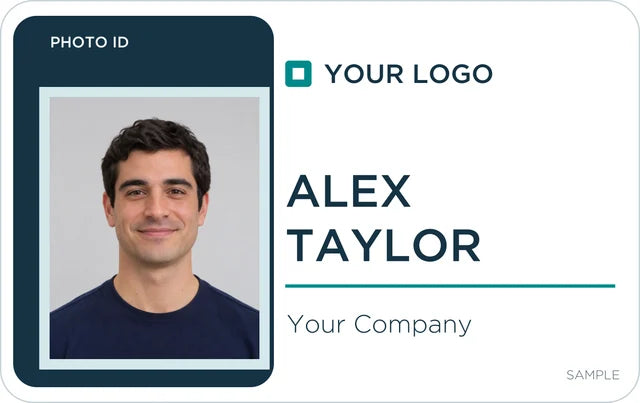
For photo ID badges, add each person and their portrait in the Photo ID designer. This CSV template imports names into the regular name badge designer.
Open the name badge designerOrdering badges for a team? Start with the information your staff need to show, collect the names and artwork, then review the final proof before production. This guide covers logo name badges, employee photo IDs, and future orders for new hires.
Design name badges with your logo · Design employee photo ID badges
1. Choose name badges or photo ID badges
Name badges: logo, name, and title
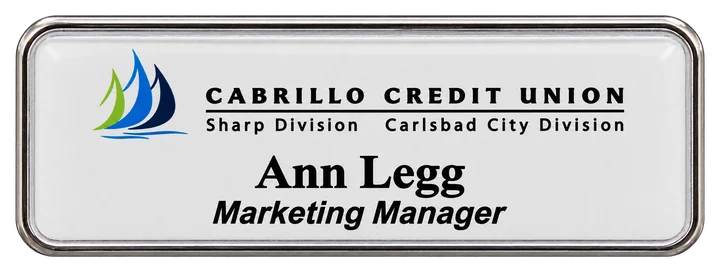
Choose a name badge when staff need a readable name and your organization’s branding. The designer offers two styles:
- Engravable name badges: a full-color logo with laser-engraved names and titles. Choose white, brushed gold, or brushed silver, with frames on eligible sizes.
- Full-color printed name badges: printed logos and text, a frameless design, and an included protective gloss coat. An epoxy dome is optional.
Both styles offer magnetic or pin fasteners, several sizes, and individual names. Use the name badge quantity-pricing table to compare the current tiers and inclusions.
Start a name badge orderPhoto IDs: an individual portrait and staff details
Choose a photo ID when each badge needs a portrait as well as your logo and identifying text. Pick a portrait or landscape layout, then choose front-only or front-and-back printing.
A two-sided badge gives you room for a back heading and message, such as contact information or return instructions. Review optional attachments in the designer before checkout.
Start a photo ID badge order2. Collect the names, logo, and photos
- Names and text: confirm spelling, capitalization, titles, and the number of copies for each person. Decide which company or organization text should be shared across the design.
- Logos and back artwork: use SVG, PDF, PDF-compatible Illustrator, PNG, JPG, or WebP. Name badge logo uploads can be up to 5 MB each. Photo ID logo and back-artwork uploads can be up to 10 MB each. PDF previews use the first page. Original uploads are retained for production. For EPS or another unsupported format, export an SVG or PDF, or ask us for artwork help.
- Photo IDs: collect one portrait per person. Use a clear JPG, PNG, or WebP up to 10 MB, with enough space around the face to adjust the crop. Large phone photos are resized for the preview while the original is kept for production.
- Back printing: prepare the heading, smaller message, or supported artwork for the back if you select two-sided photo IDs.
For regular name badges, you can add names individually or import a list. CSV headings are Name, Title, Copies; for a TXT file, put one name on each line. Review the import before using it.
3. Check the layout and badge options
Preview your logo and text together. Adjust their size and placement, then check the selected badge size, color, corners, and fastener. For photo IDs, check the portrait crop, orientation, printed sides, and any attachments.
The online preview helps you plan the design. Your final proof confirms the artwork and order details before production.
4. Review your order and check out as a guest
Review the total badge quantity and selected options. Enter the contact name and email for your order and proof; company and phone are optional. These contact details are separate from the wording printed on the badges.
You can order without an account. If you want to reopen a saved design on another computer or phone, use the optional email-code sign-in and save your design. Current pricing applies when you reorder.
Continue to secure Shopify checkout to review shipping, tax, and the final amount and complete payment.
5. Approve the PDF proof before production
After checkout, Recognition Direct sends a final PDF proof. Check:
- Every name, title, spelling, and copy quantity.
- Logo appearance, text size and placement, and photo crops.
- Badge size, color, corners, finish, and fastener or attachment.
- Both front and back when you ordered two-sided photo IDs.
Request any changes before approving. Production begins after you approve the final proof.
6. Plan for new hires and future names
Reorder from a saved design
Save your badge design while signed in with your verified email. When a new employee joins, reopen it, review the badge choices, and enter the new name or photo. You can keep a consistent layout without starting from scratch.
Express One: prepay for name badges and add names later
For engravable and full-color name badges, Express One lets you prepay for extra badges and receive the quantity tier for the full prepaid total. We make the badges needed now and hold the remaining stock for later names.
Example: need 10 now? Prepay for 25, receive the 25–49 quantity tier for your selected options, and have 15 badges held for future names. Contact us for additional names from your remaining stock. Additional releases receive priority production; shipping is billed separately.
Compare Express One prepaid stock and saved-design reorders or ask about prepaid badge stock.
7. Choose U.S. shipping or Spring Valley pickup
Name badges and photo ID badges can be shipped to U.S. customers or picked up at 8680 Troy St., Spring Valley, CA 91977. Wait for your ready-for-pickup notice before coming in.
For local help, visit our San Diego name badge service page. Have a special size, shape, or color request? Contact Recognition Direct before ordering.
Ready to build your team’s badges?
Choose your designer, add the details for your team, and review your order. We send the final proof before production.